Swapping a face used to mean a weekend of Photoshop layers and a result that fooled exactly nobody. In 2026, you can drop two photos into a browser tab and have a believable swap before your coffee cools.
The catch? “Free” is doing a lot of heavy lifting in this category. Some tools give you five swaps and then politely show you the paywall. Others hand you a clean photo but stamp a fat watermark on anything that moves. A few are genuinely free—if you’re willing to install 40 GB of models and make friends with a command line.
I went through the current crop of face swap tools—web apps, open-source projects, and the “free trial that isn’t really free” crowd—to figure out which ones actually let you swap faces without paying, and which ones just say they do. Below are the picks worth your time, sorted by how you’ll actually use them: quick browser swaps, serious local control, and the paid options that are honestly worth it when free hits its ceiling.
First, what does “free” actually mean here?
This is the part nobody tells you, and it’s the single most useful thing to understand before you start clicking. In face swap land, “free” hides at least four very different deals—and only two of them are the kind of free you actually want:
- Truly free, no watermark. Swap as much as you like and download clean results, no logo, no catch. It exists, but it’s rare—and usually limited to photos.
- Free daily credits that refresh. You get a set amount of swaps per day (or per login) that resets every 24 hours. This is the sweet spot: genuinely usable for free, forever, as long as you’re not running a content farm.
- Free, but watermarked or downscaled. This is the most common bait. You can swap for “free,” but the output comes stamped with a logo or capped at 720p/512px, and removing either means paying. Fine for testing; useless for anything you actually want to post.
- Free and open-source. Completely free with zero watermark and total privacy—because it runs on your computer. The price is paid in setup time and GPU horsepower instead of dollars.
Keep these four buckets in mind as you read. When I call something “the best free option,” I’m leaning hard toward the first two—and I’ll flag clearly whenever a “free” tool is really the third kind in disguise.
What else makes a great free face swap tool
Beyond how it’s free, here’s what I was actually looking for when testing.
- Output quality and resolution. A lot of free tools are built on the open-source inswapper model, which swaps at just 128×128 pixels internally and then upscales. That’s the root of the “plastic sticker face” look you’ve probably seen. The good tools either add a face enhancer or use newer diffusion models.
- Video consistency. Photos are easy. Video is where tools fall apart—the moment a head turns or something crosses the face, weaker models “lose” the identity and snap back to the original face mid-clip.
- Multi-face handling. Group photos and dance videos need the tool to detect several faces and let you swap just the one you want.
- No install, no friction. For most people, “open a tab and go” beats “set up a Python environment” every time.
- Watermarks and privacy. Does the free output come out clean? And where do your uploaded photos go afterward?
Here’s how the top picks stack up at a glance.
| Tool | Type | How free it is | Video | Watermark (free) | Best for |
| FaceFusion.co | Web | Daily free credits | ✅ up to ~5 min | None | Best free option overall |
| Vidwud | Web | Free photos/GIFs | ⚠️ video paid/limited | None on photos | Free multi-face photos |
| Magic Hour | Web | 5 photos/day, no sign-up | ✅ (watermarked) | None on photos | No-sign-up + steady video motion |
| Pixlr | Web | Free, no sign-up | ❌ photo-first | Mostly none | Swap inside a full photo editor |
| Remaker AI | Web | 30 credits + daily top-ups | ✅ (burns credits) | Yes | Daily free photo realism |
| Pica AI | Web | ~4–8 credits | ✅ (slow) | Yes | Group photos |
| CapCut | Editor app | Free templates | ✅ (filter-style) | Some none | Social video templates |
| FaceFusion (open-source) | Local | 100% free | ✅ | None | Privacy + full control |
| ReActor / Roop | Local (SD) | 100% free | ✅ (workflow) | None | Swaps inside Stable Diffusion |
| VisoMaster | Local | 100% free | ✅ real-time | None | Advanced/real-time video |
| Flux.2 Klein + BFS / Qwen | Local model | 100% free | Image-first | None | Highest-quality head swaps |
The best free face swap tools you can use in your browser
No download, no GPU, no terminal. These run in a tab.
FaceFusion.co (best free face swap overall)

Platform: Web
Pros:
- Daily free credits and clean, watermark-free output
- Swaps up to 6 faces in one video, even on the free plan
The thing that immediately sets FaceFusion.co apart is that it doesn’t make you choose between “free” and “watermark-free”—you get both. You sign up, you get a batch of free credits that refresh every 24 hours, and whatever you download comes out clean, no logo stamped in the corner. For a category where the standard move is to brand your free exports into uselessness, that’s a genuinely big deal.
It runs entirely on cloud GPUs, so it doesn’t care whether you’re on a gaming rig or a five-year-old laptop. Upload your source video or photo, drop in the target face, and you’ve got a swap in seconds. Video clips up to about 5 minutes work on the free tier, and it handles nine formats (MP4, MOV, AVI, MKV, WMV, WebM, FLV, GIF, and TS). The feature that surprised me most was multi-face: feed it a group video and it’ll detect and replace up to six faces at once—the kind of thing competitors usually lock behind a subscription.
In use, it’s about as low-friction as this gets: no install, no settings rabbit hole, just upload and go. When a source clip looked a little soft, flipping on the built-in face enhancer noticeably sharpened skin texture. If you only try one tool from this list, make it this one.
Pricing: Free with daily refreshing credits and no watermark. Paid plans add more credits, 4K output, lip sync, and priority processing.
Vidwud (best for free multi-face photos)

Platform: Web
Pros:
- Genuinely free, watermark-free photo and GIF swaps with no account needed
- Multi-face swap (2–6 faces) included free
Cons:
- Side profiles and fast head turns are rough
- Video is the paid/limited part, and processing can crawl
Vidwud’s pitch is “100% free, no watermark,” and for photos and GIFs, that holds up. Upload a clear, front-facing headshot as the target and a source image, and you’ll have a clean result in about 2–3 seconds—skin tones matched, edges blended, you have to zoom in to find the seams. Multi-face is free here too, which is rare.
The illusion breaks the moment you go off-axis. Three-quarter and profile shots come back with misaligned jawlines and the occasional uncanny-valley warp. Video is a different animal: a 30-second clip took me roughly 8 minutes to process (plus a 7–9 minute queue at peak), and on one motion test the swapped face briefly “snapped” back to the original during a 45° turn before recovering. One practical heads-up from the community: stick to the browser version and skip any desktop software it tries to bundle.
Pricing: Free for photos, GIFs, and multi-face swaps. Video face swap starts around $12.99/month.
Magic Hour (best free swap with no sign-up)

Platform: Web
Pros:
- No account needed; 3 watermark-free photo swaps per day
- Best-in-class video motion handling—faces don’t jitter when the subject moves
Cons:
- Free video is watermarked and capped around 512px
- No GIF or batch support yet
Magic Hour is the one I’d hand to someone who just wants to try a swap right now. No sign-up, five clean photo swaps a day, done. Across a stack of test photos with different lighting and angles, its results consistently avoided that telltale “AI look,” which is why it keeps showing up at the top of 2026 roundups.
Where it really earns its spot is video. The single hardest problem in face swapping is keeping the identity stable when the head moves—and Magic Hour holds the face together through quick motion better than most. The trade-off is that free video exports carry a watermark and top out around 512px, so it’s a great place to test before you decide whether to pay for clean HD.
Pricing: Free with 5 watermark-free photo swaps/day. Creator plan from about $10/month (annual) for no watermark, higher resolution, and commercial rights.
Pixlr

Platform: Web
Pros:
- 100% free, no sign-up, basically no watermark
- Comes attached to a full image editor for post-tweaks
Cons:
- Face detection misaligns on big angles or low-contrast shots
- Photo-first; not built for video
Pixlr is the move when the swap is only step one. It’s a free, no-login browser editor where face swap sits next to 20+ other tools—so you can swap a face and then immediately recolor, retouch, and composite without changing apps. For front-facing photos it does the job, and the surrounding editing suite is the real draw.
Just know its face detection is less precise than the dedicated tools; large angles or low-contrast photos can come out misaligned. The value here isn’t “how perfectly it swaps,” it’s “what you can do to the result afterward.”
Pricing: Free, no sign-up. Optional Plus/Premium tiers for the broader editor.
Remaker AI (best for daily free photo realism)
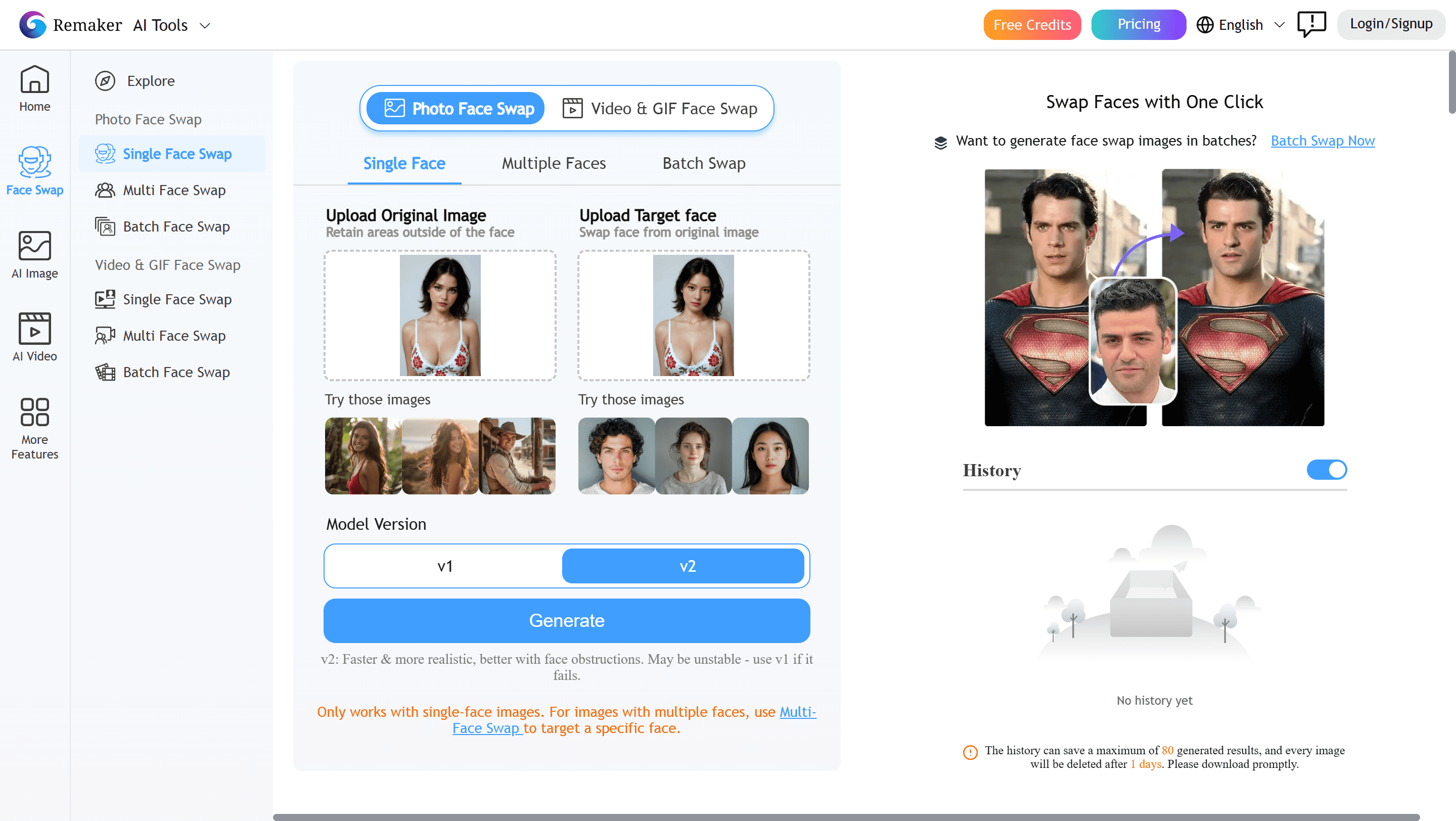
Platform: Web
Pros:
- Genuinely realistic photo swaps—skin tone, lighting, even pore texture
- 30 credits on sign-up plus daily top-ups that never expire
Cons:
- Free output is watermarked
- Video burns credits fast and is weaker than dedicated video tools
Remaker leans into photo quality, and it shows. My first swap—my face into a vacation photo—took about 18 seconds and looked genuinely natural, holding up even at full resolution, which is rare for a free tool. The free model is built for the daily grinder: 30 credits to start, plus a few free credits every time you log in, and they don’t expire—so light, consistent use stretches a long way.
The honest caveats: free results are watermarked, and you’ll likely bump the daily ceiling within your first hour of real experimentation. Video can drift into distortion when the source lighting is poor. The big lesson from testing: your input quality decides everything—front-facing, well-lit, and above 1000px makes the difference between “wow” and “something’s off.”
Pricing: Free with 30 credits + daily top-ups (watermarked). Credit packs from about $5.99 for 200 credits.

Pica AI

Platform: Web
Pros:
- Excellent automatic multi-face detection for group shots
- 4 free credits without even signing up
Cons:
- Video is painfully slow on the free tier
- Caps at three faces in a group; watermarked free output
Pica AI’s party trick is the group photo. Upload a multi-person shot and it automatically pops open a multi-face panel, identifies each person, and lets you swap them individually with convincing results. For family pics and group selfies, it’s one of the smoother experiences—and you get a few free credits before you’ve even made an account.
Then you try video. A sub-one-minute clip kept testers waiting anywhere from 40 minutes to over an hour—and the result still had a watermark. It also tops out at detecting three faces in a group (a four-person photo stumped it where others didn’t), and low-res or dim inputs degrade fast. Great for the occasional group photo; not your video workhorse.
Pricing: Free with ~4–8 starter credits and daily login credits (watermarked). Paid plans remove watermarks.
CapCut (best for social video templates)
Platform: Web, iOS, Android, desktop
Pros:
- One-click template swaps with zero workflow disruption
- It’s already a full editor, so you go from swap to finished Reel in one app
Cons:
- Filter-style swap is low on precision and control
- Best templates and full watermark removal need Pro
CapCut treats face swap as a feature inside a video editor, and for social content that’s exactly right. Pick a face-swap template, drop in your media, and minutes later you’re trimming, captioning, and exporting a TikTok or Reel without ever leaving the app. There’s a whole menu of styles, too—gender swaps, “turn into a villain,” baby-face, the works.
The flip side of “it’s a filter” is that you get very little control over angle, lighting, or expression matching, and results lean unrealistic compared to dedicated swappers. Manually positioning a face on a moving subject is fiddly. It’s a blast for memes and trends; it’s not where you go for clean, high-res output.
Pricing: Free with face swap and basic templates (some watermark-free). Standard plan from about $5.99/month unlocks premium styles and removes watermarks.
A few more worth a quick mention: WaveSpeed spits out full-resolution, watermark-free PNGs in about 4.2 seconds—the fastest “just give me one clean photo swap” option. Facy.ai offers unlimited free, no-signup photo swaps at medium resolution, perfect for everyday social posts. And Reface is still the mobile meme king for quick, shareable swaps—just expect a watermark and near-zero control. (Worth knowing: Vidnoz, a popular all-in-one option, has reportedly wound down its standalone face swap to focus on AI video, and has drawn complaints about billing and bundled ads—so I’d approach it cautiously.)
The best free open-source face swap tools
Here’s the trade you’re making in this section: these are completely free, watermark-free, and run on your own machine (so your photos never leave your computer). The price is setup time and a decent GPU—most of these love NVIDIA and merely tolerate AMD or Mac.
FaceFusion (open-source) — best for privacy and control

Platform: Windows, macOS, Linux (local)
Pros:
- Fully open-source, local, and private—nothing uploads anywhere
- Wide menu of swap and enhancer models you can mix and match
Don’t confuse the two FaceFusions. FaceFusion.co (above) is the cloud web app with daily free credits. FaceFusion here is the open-source GitHub project (facefusion/facefusion, site at facefusion.io)—software you install and run yourself, with no credits and no watermark.
This is the heavyweight of free, local face swapping—around 28.7k GitHub stars, currently on version 3.6.1 (April 2026), under an OpenRAIL-AS license. It runs entirely on your hardware, so there’s no cloud, no credits, and no data leaving your machine. You get a real menu of models: swappers like inswapper_128, simswap_256, simswap_512, and uniface_256, plus enhancers like GFPGAN, CodeFormer, and GPEN (up to 2048px), and even lip-sync and colorizer processors.
The community consensus is that it’s the reliable one. Folks describe a one-click install via Pinokio that runs fine even on mid-range hardware, and more than one person who spent hours fighting a finicky ComfyUI workflow noted that FaceFusion just did the swap in seconds. The power-user tip worth stealing: by default it only runs the swapper, so turn on the gfpgan_1.4 enhancer and bump pixel boost to 512+ to seriously level up skin texture and realism. If privacy and control matter more than convenience, this is your tool.
Pricing: Free and open-source.
ReActor & Roop (best for swaps inside Stable Diffusion)
Platform: Windows, macOS, Linux (Stable Diffusion / ComfyUI extension)
Pros:
- Lightweight and free, right inside your existing SD/ComfyUI workflow
- Tons of community tutorials and presets
Cons:
- Built on 128px inswapper, so detail is limited and “plastic” creeps in
- Occlusions, profiles, and fast turns break it
Roop was the original one-click face swapper; ReActor became its more capable successor and the default choice inside Stable Diffusion since late 2023. Both run as extensions on the same InsightFace inswapper_128 model, usually paired with CodeFormer for face restoration. The community verdict is “stable and good enough once it’s set up”—with one tester noting that if the skin texture looks off, you just run the output frames through an upscaler like Magnific.
The recurring asterisk: it works “as long as the face isn’t obstructed.” Add a hand, glasses, hair, or a sharp profile and it falls over, and the 128px base means detail is always going to be a ceiling. One more practical note—the inswapper_128 model has had licensing tightened recently, so some platforms no longer host it and commercial use means contacting InsightFace.
Pricing: Free and open-source.
VisoMaster (best for advanced and real-time video)
Platform: Windows (NVIDIA-optimized)
Pros:
- The most feature-complete free video swapper—expression restoration, DFM model support, even live webcam swapping
- Optimized for modern NVIDIA GPUs (including RTX 50 series)
Cons:
- Effectively Windows + NVIDIA only
- Real learning curve; not a casual tool
When someone in a “free video face swap” thread says one tool is “the best by a long shot,” they’re usually talking about VisoMaster. What wins people over is the depth: an Expression Restorer that transfers the original clip’s emotions and mouth movements onto the swapped face, support for importing DeepFaceLab’s custom DFM models, multi-source face embeddings for better likeness, and real-time swapping over webcam for streaming. The newer “Fusion” build is faster with a cleaner UI.
The cost of all that power is the usual one: it’s basically tied to Windows and NVIDIA, and the setup and learning curve will send casual users running. But if you’re serious about local video work, nothing free is more capable.
Pricing: Free and open-source.
Flux.2 Klein + BFS LoRA & Qwen Image Edit (best for highest-quality head swaps)
Platform: Local (ComfyUI)
Pros:
- Diffusion-based quality that blows past 128px—better lighting, angles, and full head swaps
- Can target a specific person in a multi-person scene
Cons:
- Heavy VRAM, big model downloads, and prompt-fiddling required
- Video consistency across frames is still unsolved
This is where the cutting-edge crowd has landed in 2026. The popular recipe is Flux.2 Klein (9B) plus the community BFS (“Best Face Swap”) LoRA, often with an Enhanced-Details LoRA to kill the flat, plastic lighting that diffusion models tend to produce. The payoff is real: higher resolution than the old 128px pipeline, better blending, and true head replacement rather than a pasted-on face. Qwen Image Edit is the other favorite here, praised for keeping facial identity consistent (some testers prefer it to Klein).
It is not plug-and-play. The honest gripes from users: Klein sometimes imposes its own “buff cheeks and wide nose,” so the result doesn’t quite look like the target; prompts matter a lot; and video is still the wall—”the first frame is perfect, the rest revert to the original face.” Add big VRAM requirements and tens of gigabytes of models, and this is firmly enthusiast territory. (Related but different: LivePortrait keeps coming up in these conversations—just note it animates a still photo’s expressions rather than swapping identity, so it’s a companion to face swap, not a face swapper itself.)
Pricing: Free and open-source (you supply the hardware).
If you’d rather just pay: face swap tools worth the money
Free is great until you hit its ceiling—usually around watermarks, resolution, video stability, or the sheer time of doing it yourself. When that happens, these are the paid options that earn it.
DeepSwap (best for polished, multi-face video)

Platform: Web, iOS, Android
Pros:
- Fast, stable video face swap with strong multi-face detection
- Up to 4K output and clips up to ~30 minutes, with high likeness on the Pro model
DeepSwap is the one reviewers keep reaching for when quality is the point. After a 60-day test, one called it well worth it for creators—photos, videos, and GIFs swapped in a few clicks, up to 4K, with results that look great when you feed it good source images. Its multi-face handling drew specific praise: on a five-person group photo, it identified every face and let testers swap just two of them with a single click—fast and intuitive in a way one-to-one tools can’t match. Another measured the highest face-similarity score of any tool they tried, and a 2026 video roundup named it best for realism under difficult lighting and angles. The throughline in every review: no editing skills required—upload, swap, done.
Just set expectations on “free”: DeepSwap is a paid tool with a limited trial (roughly two watermarked photo swaps a day), and video swapping needs a subscription. Think of it as the upgrade you make once free tools stop keeping up.
Pricing: From about
9.99/month∗∗(≈∗∗
9.99/month∗∗(≈∗∗4.17/month billed annually). See current plans.
Akool (best for enterprise and API workflows)
Platform: Web
Pros:
- 4K/8K output, live video-call swapping, and high-volume multi-face
- Clean, beginner-friendly interface despite the enterprise feature set
Cons:
- Free tier is 720p with a watermark, and credits are hard to predict
- Alignment slips in low light or fast motion; support is email-only
Akool aims at marketing teams and developers, and it shows in the feature list: 4K/8K exports, real-time face swap on video calls, and multi-face processing at scale (up to 16K on the business tier). In use it’s genuinely smooth—upload a clip, pick a face, get a believable result in minutes. The free plan gives you about 600 credits (≈25 images or 1.5 minutes of video), but capped at 720p with a watermark, and the credit math can be tricky to forecast at volume.
Pricing: Free ~600 credits (720p, watermarked). Paid from about
10/month∗∗(Creator)upto∗∗
10/month∗∗(Creator)upto∗∗30–$119/month for Pro tiers.
A quick, important note on using these responsibly
Face swapping is fun, but it comes with real responsibility. Only swap faces with the consent of the people involved—never to deceive, harass, impersonate, or create non-consensual intimate imagery, which is illegal in a growing number of places. And the rules are tightening: under the EU AI Act (Article 50), from August 2026 AI-generated and face-swapped content must be disclosed and carry machine-readable provenance metadata, even when there’s no visible watermark—with similar laws emerging in the US, UK, and South Korea. If you publish a swap, label it as AI-edited. Detection tools are also getting good at spotting swaps, so keep it honest.
The bottom line
If you want the simplest answer: start with FaceFusion.co. It’s the rare tool that’s free, watermark-free, works on video, and doesn’t ask you to install anything—exactly what most people mean when they search for “free face swap.” From there, branch out based on your needs: Vidwud or Pica AI for group photos, Magic Hour for no-sign-up speed and steady video, Remaker for daily photo realism, and CapCut for social-ready templates. If you care most about privacy and control, the open-source FaceFusion and VisoMaster are unbeatable for the price (free)—just bring patience and a GPU. And when free finally hits its ceiling on quality or stable video, DeepSwap is the upgrade that quietly handles the hard parts for you.